Gamdias AURA GC9M Elite ARGB Bedienungsanleitung
Gamdias Nicht kategorisiert AURA GC9M Elite ARGB
Lies die bedienungsanleitung für Gamdias AURA GC9M Elite ARGB (2 Seiten) kostenlos online; sie gehört zur Kategorie Nicht kategorisiert. Dieses Handbuch wurde von 23 Personen als hilfreich bewertet und erhielt im Schnitt 4.2 Sterne aus 8 Bewertungen. Hast du eine Frage zu Gamdias AURA GC9M Elite ARGB oder möchtest du andere Nutzer dieses Produkts befragen? Stelle eine Frage
Seite 1/2
1. General Safety Warnings
Always ensure the computer case is placed on a stable, flat surface to prevent it from tipping over.
Keep the case away from water, moisture, or high humidity environments to avoid electrical hazards.
Do not block or obstruct the ventilation openings to ensure proper airflow and prevent overheating.
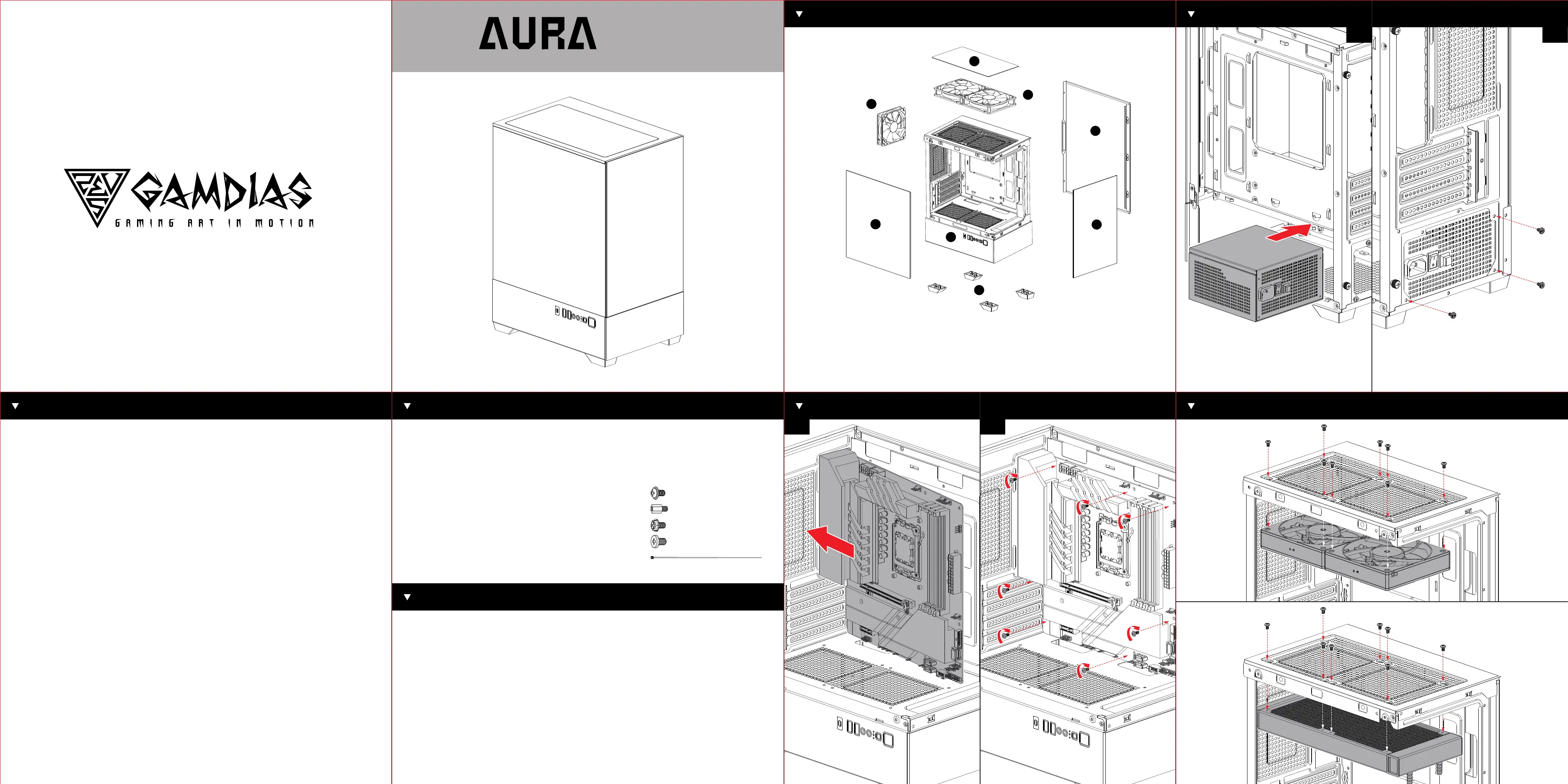
1. Gaming Case : AURA GC9M Elite ARGB
1.Front Panel
2.Top Megnetic Dust Filter
3.IO Port Module
4.Right Side Panel
5. Left Side Tempered Glass
6. Rear Fan
7. Top Fans
8. Chassis Pedestals
2. Chassis Protection : EPS Protection Foam
3. Chassis Dust Cover
4. Preinstalled Fans : GAMDIAS ARGB Fans x 3
5. Accessory Box : Screws and Standoffs
A.Motherboard/ SSD screws (18) --------------------------------------------------------------
B.Motherboard additional standoffs (3)------------------------------------------------------
C.PSU/ GPU PCIe screws (6)-----------------------------------------------------------------------
D.HDD cage screws (9)--------------------------------------------------------------------------------
E.Cable ties (5)----------------------------------------------------------------------------------------------
1. Case Type: Mini Tower
2. Motherboard Support: Micro-ATX, Mini-ITX
3. Expansion Slots: 4
4. Material: SPCC, ABS, Tempered Glass
5. Product Dimension : 295 x 195 x 395 mm(11.61 x 7.68 x 15.55 inch)
6. Chassis Dimension : 280 x 195 x 380 mm(11.02 x 7.68 x 14.96 inch)
7. Radiator Support : 2 x 120mm ( Radiator length < 278mm) Rear: 1 x 120mm
8. Fan Support : Top: 2 x 120mm Rear: 1 x 120mm
9. Motherboard Sync : No
10. Drive Bays : 1 x 3.5" or 1 x 2.5"(HDD Cage)
11. Clearence : CPU cooler height limitation: 155mm VGA length limitation: 280mm PSU
2. Electrical Safety
Disconnect the power supply before installing or modifying any internal components.
Avoid touching internal components directly; always ground yourself to prevent static discharge, which can
damage sensitive components.
Use only compatible power supplies and cables, ensuring that all connections are secure and free from
fraying or damage.
3. Handling Precautions
Handle the computer case with care during transportation to prevent physical damage.
Use appropriate tools when assembling or disassembling components inside the case to avoid injury.
Do not force components into place; ensure they align properly before securing them.
4. Fire Hazard Warnings
Ensure all components are properly ventilated and not overheating, as this can be a potential fire hazard.
Avoid overloading electrical circuits connected to the computer case to prevent overheating and potential
fire risks.
Keep flammable materials away from the computer case.
5. Child Safety
Keep the computer case and its components out of reach of children.
Do not allow children to play with or operate the computer case, especially when it is powered on.
6. Cleaning and Maintenance
Unplug the computer case from the power source before cleaning.
Use a dry, soft cloth for cleaning the exterior of the case. Do not use liquid cleaners or aerosols.
Periodically check and clean the ventilation openings to ensure proper airflow.
7. Installation Safety
Ensure that all components are installed correctly and securely before powering on the system.
Double-check connections and screws to prevent potential hazards during operation.
Follow the manufacturer's guidelines for component installation and ensure compatibility with the case.
8. Disposal Instructions
Dispose of the computer case and its components according to local electronic waste regulations.
Safety Information
Motherboard Installation
0102
Case Layout and Parts Identification
Specification
Fan and Cooling System Setup
0102
Power Supply Unit (PSU) Installation
Package Contents
1
2
3
4
5
6
7
8
A R G B
MINI-Tower PC Case
GC9M
ELITE
Produktspezifikationen
| Marke: | Gamdias |
| Kategorie: | Nicht kategorisiert |
| Modell: | AURA GC9M Elite ARGB |
Brauchst du Hilfe?
Wenn Sie Hilfe mit Gamdias AURA GC9M Elite ARGB benötigen, stellen Sie unten eine Frage und andere Benutzer werden Ihnen antworten
Bedienungsanleitung Nicht kategorisiert Gamdias

31 März 2026
31 März 2026
28 Februar 2026
28 Februar 2026
27 Februar 2026
25 Februar 2026
18 Februar 2026
19 Januar 2026
12 Januar 2026
3 Januar 2026
Bedienungsanleitung Nicht kategorisiert
Neueste Bedienungsanleitung für -Kategorien-
3 April 2026
3 April 2026
3 April 2026
3 April 2026
3 April 2026
3 April 2026
3 April 2026
3 April 2026
3 April 2026
3 April 2026