JLab Create Wireless Bedienungsanleitung
Lies die bedienungsanleitung für JLab Create Wireless (2 Seiten) kostenlos online; sie gehört zur Kategorie Mikrofon. Dieses Handbuch wurde von 31 Personen als hilfreich bewertet und erhielt im Schnitt 4.3 Sterne aus 7 Bewertungen. Hast du eine Frage zu JLab Create Wireless oder möchtest du andere Nutzer dieses Produkts befragen? Stelle eine Frage
Seite 1/2
We love that you are rocking JLab!
We take pride in our products and fully stand behind them.
CREATE WIRELESS
LAV MIC SYSTEM
YOUR WARRANTY
All warranty claims are subject to JLab authorization
and at our sole discretion. Retain your proof of
purchase to ensure warranty coverage.
CONTACT US
Reach out to us at [email protected]
or visit jlab.com/contact
REGISTER TODAY
jlab.com/register
Product updates How-to tips|
FAQs & more
L
I
M
I
T
E
D
T
W
O
Y
E
A
R
W
A
R
R
A
N
T
Y
S
U
P
P
O
R
T
T
E
A
M
#
T
E
A
M
J
L
A
B
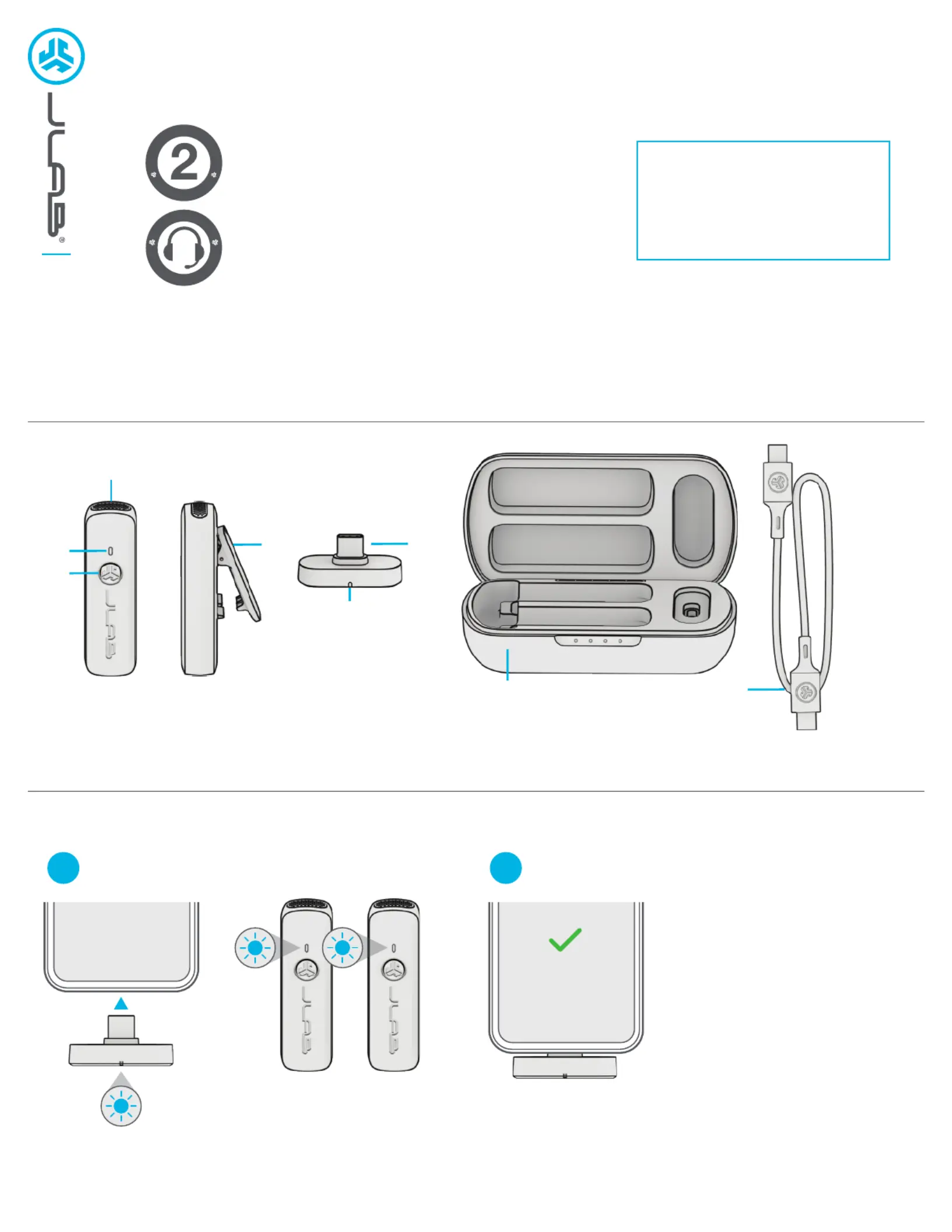
PAIR UP
Dongle Blinks Blue = Searching for Microphone(s)
Dongle Solid Blue = Microphone(s) Connected
Plug USB-C dongle into compatible device*.
Remove single or both microphones.
1
Most devices default Create Wireless
as the recording source. Check your
device audio settings to confirm.
Create Wireless
*Compatible devices:
Android (12 or later) USB-C mobile devices and tablets
Windows PC (7 or later)
macOS (11 or later)
iPhone 15+
iPad Pro 11-inch (1st generation or later)
iPad Pro 12.9-inch (3rd generation or later)
iPad Air (4th generation or later)
iPad mini (6th generation)
2
1
2
3
4
5
6
7
8
1 Microphone
2 LED Indicator
3 Multifunction Button
4 Lapel Clip
5 USB-C Dongle
6 LED Connection Indicator
7 Charging Case
8 USB-C Charging Cable
Produktspezifikationen
| Marke: | JLab |
| Kategorie: | Mikrofon |
| Modell: | Create Wireless |
Brauchst du Hilfe?
Wenn Sie Hilfe mit JLab Create Wireless benötigen, stellen Sie unten eine Frage und andere Benutzer werden Ihnen antworten
Bedienungsanleitung Mikrofon JLab

31 Juli 2025
31 Juli 2025
31 Juli 2025
2 August 2024
Bedienungsanleitung Mikrofon
Neueste Bedienungsanleitung für -Kategorien-
3 April 2026
1 April 2026
30 März 2026
29 März 2026
29 März 2026
29 März 2026
28 März 2026
26 März 2026
24 März 2026
24 März 2026