Mercusys MS106GP Bedienungsanleitung
Mercusys Nicht kategorisiert MS106GP
Lies die bedienungsanleitung für Mercusys MS106GP (3 Seiten) kostenlos online; sie gehört zur Kategorie Nicht kategorisiert. Dieses Handbuch wurde von 14 Personen als hilfreich bewertet und erhielt im Schnitt 4.8 Sterne aus 7 Bewertungen. Hast du eine Frage zu Mercusys MS106GP oder möchtest du andere Nutzer dieses Produkts befragen? Stelle eine Frage
Seite 1/3
LED Explanation
Model: MS106LP/MS106P/MS106GP/MS110GMP/MS112GMP
Quick Installation Guide
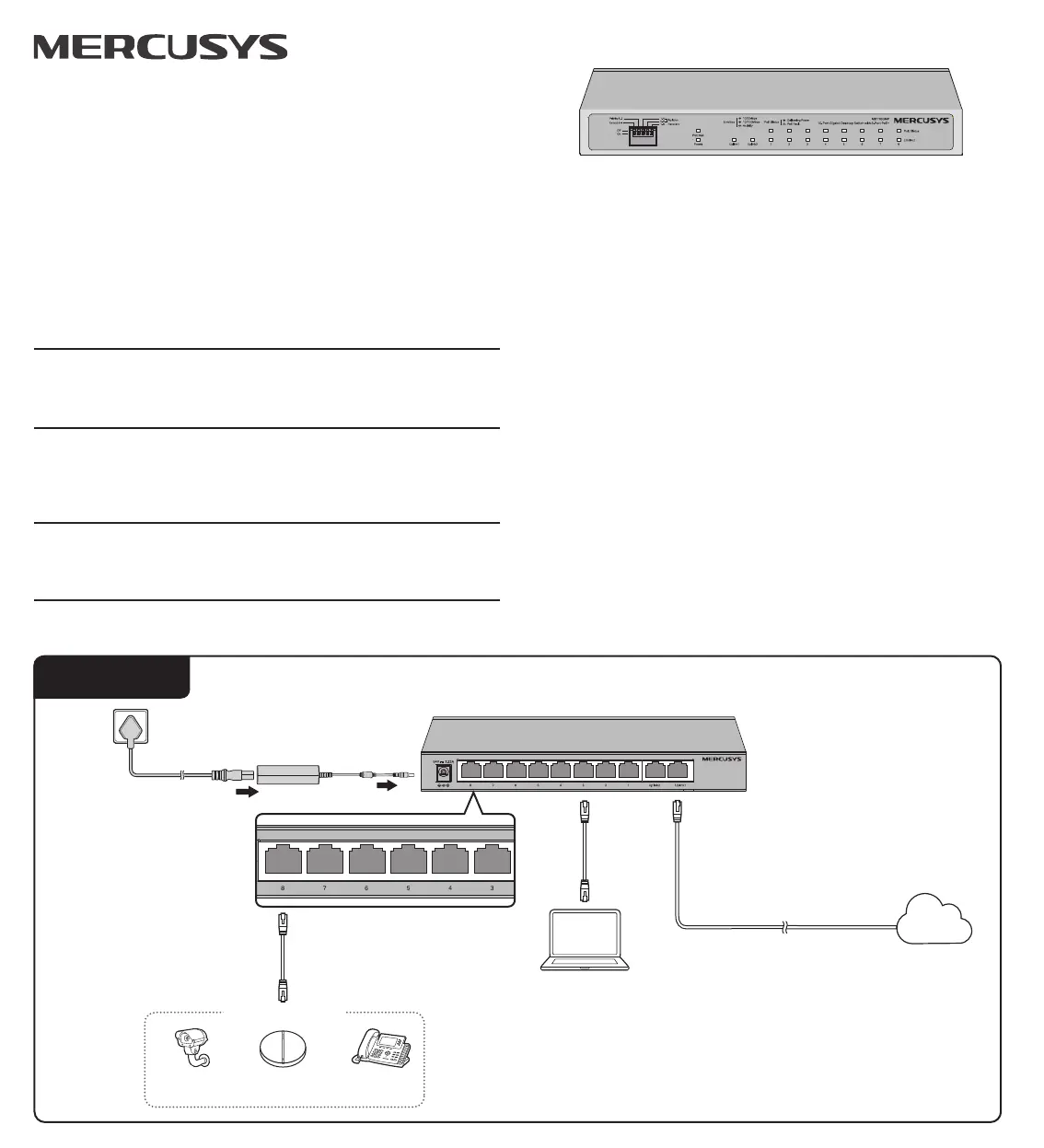
Connection
PC
PoE Ports
1. PoE ports can also connect to non-PoE devices, but only transmit data.
2. Non-PoE ports (ports 5-6 of MS106LP/MS106P/MS106GP and uplink ports of
MS110GMP/MS112GMP) are recommended to connect to uplink devices like gateways.
3. By default, ports 1-2 of MS106LP/MS106P/MS106GP/MS112GMP have higher priority than
other ports in transmitting data if network congestion occurs. It is recommended to connect
key network devices (network cameras, APs, etc.) to ports 1-2.
4. The SFP slot of MS112GMP needs to work with a gigabit SFP module.
Notes:
Internet
IP CameraAPIP Phone
Powered Device (PD)
Power
On: The power is on
O: The power is o
Link/Act Status
On: Link present but no activity
Flashing: Transmitting or receiving data
O: No link
PoE Status
On: Providing PoE power
O: Not providing PoE power
Link/Act; Uplink
Green On: Running at 1000 Mbps, but no
activity.
Green Flashing: Running at 1000 Mbps and
transmitting/receiving data.
Yellow On: Running at 10/100 Mbps, but no
activity.
Yellow Flashing: Running at 10/100 Mbps and
transmitting/receiving data.
O: No link
DIP Switch Explanation
O: Ports run at 1000/100/10 Mbps (100/10 Mbps for MS106LP and MS106P) and
support PoE power supply up to 100m away.
On: Ports run at 10 Mbps and support PoE power supply up to 250m away.
Extend(For all models)
O: The PoE Auto Recovery function is disabled.
On: The switch will constantly detect the working status of a PoE powered device (PD).
When the switch nds that the PD works abnormally, the switch will reboot it.
Recovery(For all models)
O: Ports can transmit data with each other.
On: The isolated ports cannot transmit data with each other. They can transmit data only
with the uplink ports (ports 5-6 of MS106LP/MS106P/MS106GP and uplink ports of
MS110GMP/MS112GMP).
Isolation(For all models)
O: All the ports transmit data with the same priority.
On: The specic ports transmit data with a higher priority than other ports.
Priority(Only for MS110GMP)
The images in this guide are for demonstration only and may differ from your actual product.
© 2025 MERCUSYS 7100002627 REV1.3.1
MS106LP/MS106P/MS106GP:MS110GMP/MS112GMP:
Power
On: The power is on
O: The power is o
PoE Status
On: Providing PoE power
Flashing: PoE fault (except MS112GMP)
O: Not providing PoE power
PoE Max (For MS110GMP)
On: 104 W≤Total power supply < 111 W
Flashing: Total power supply ≥ 111 W
O: Total power supply < 104 W
DC Power Adapter
AC Power Cord
PoE Max (For MS112GMP)
On: Remaining PoE power is ≤ 7 W
Flashing: Remaining PoE power keeps ≤ 7 W
after this LED is on for 2 minutes.
O: Remaining PoE power is > 7 W
Produktspezifikationen
| Marke: | Mercusys |
| Kategorie: | Nicht kategorisiert |
| Modell: | MS106GP |
Brauchst du Hilfe?
Wenn Sie Hilfe mit Mercusys MS106GP benötigen, stellen Sie unten eine Frage und andere Benutzer werden Ihnen antworten
Bedienungsanleitung Nicht kategorisiert Mercusys

18 März 2026
5 März 2026
4 März 2026
3 März 2026
24 Februar 2026
16 Februar 2026
16 Februar 2026
4 Februar 2026
4 Februar 2026
3 Februar 2026
Bedienungsanleitung Nicht kategorisiert
Neueste Bedienungsanleitung für -Kategorien-
3 April 2026
3 April 2026
3 April 2026
3 April 2026
3 April 2026
3 April 2026
3 April 2026
3 April 2026
3 April 2026
3 April 2026