Mibro Watch GS Bedienungsanleitung
Mibro Smartwatch Watch GS
Lies die bedienungsanleitung für Mibro Watch GS (5 Seiten) kostenlos online; sie gehört zur Kategorie Smartwatch. Dieses Handbuch wurde von 30 Personen als hilfreich bewertet und erhielt im Schnitt 4.0 Sterne aus 4 Bewertungen. Hast du eine Frage zu Mibro Watch GS oder möchtest du andere Nutzer dieses Produkts befragen? Stelle eine Frage
Seite 1/5
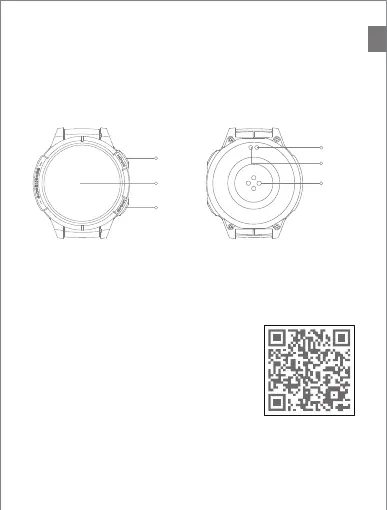
Packing list: Mibro Watch GS X 1, Quick Guide X 1,User manual X 1,
Magnetic charger X 1.
Product description
①
Please read this manual carefully before using the product and keep it properly.
.
Shortcut Button
Home button
Full touch display
②
③
Turning On: Long press the button for
2 seconds until the screen lights up
Turning Off: Long press the button for 2 seconds
until the screen turns off
Return: Click
④
⑥
⑤
Charging port (Positive)
Charging port(Negative)
Heart rate sensor
EN
①
②
④
⑤
③
⑥
Connect the watch
①Please scan the QR code to download the “Mibro Fit”App.
②Please use "Mibro Fit" to scan the QR code for pairing.
Untie a watch
① Android system: select "Delete current device" in the App to unbind the device.
②iOS system: select "Delete current device" in the App, and jump to the Bluetooth
interface of mobile phone system according to the prompt,Select Ignore Current
Device to unbind the device.
User Manual
Produktspezifikationen
| Marke: | Mibro |
| Kategorie: | Smartwatch |
| Modell: | Watch GS |
Brauchst du Hilfe?
Wenn Sie Hilfe mit Mibro Watch GS benötigen, stellen Sie unten eine Frage und andere Benutzer werden Ihnen antworten
Bedienungsanleitung Smartwatch Mibro

7 August 2025
7 August 2025
6 August 2025
28 Juli 2025
28 Juli 2025
3 September 2024
6 Juni 2024
6 Juni 2024
6 Juni 2024
6 Juni 2024
Bedienungsanleitung Smartwatch
Neueste Bedienungsanleitung für -Kategorien-
26 März 2026
21 März 2026
19 März 2026
18 März 2026
15 März 2026
12 März 2026
10 März 2026
9 März 2026
7 März 2026
1 März 2026