Tascam Portastudio Bedienungsanleitung
Tascam Nicht kategorisiert Portastudio
Lies die bedienungsanleitung für Tascam Portastudio (5 Seiten) kostenlos online; sie gehört zur Kategorie Nicht kategorisiert. Dieses Handbuch wurde von 31 Personen als hilfreich bewertet und erhielt im Schnitt 4.0 Sterne aus 9 Bewertungen. Hast du eine Frage zu Tascam Portastudio oder möchtest du andere Nutzer dieses Produkts befragen? Stelle eine Frage
Seite 1/5
Portastudio iPad Application
User’s Manual
What's in the Main Window
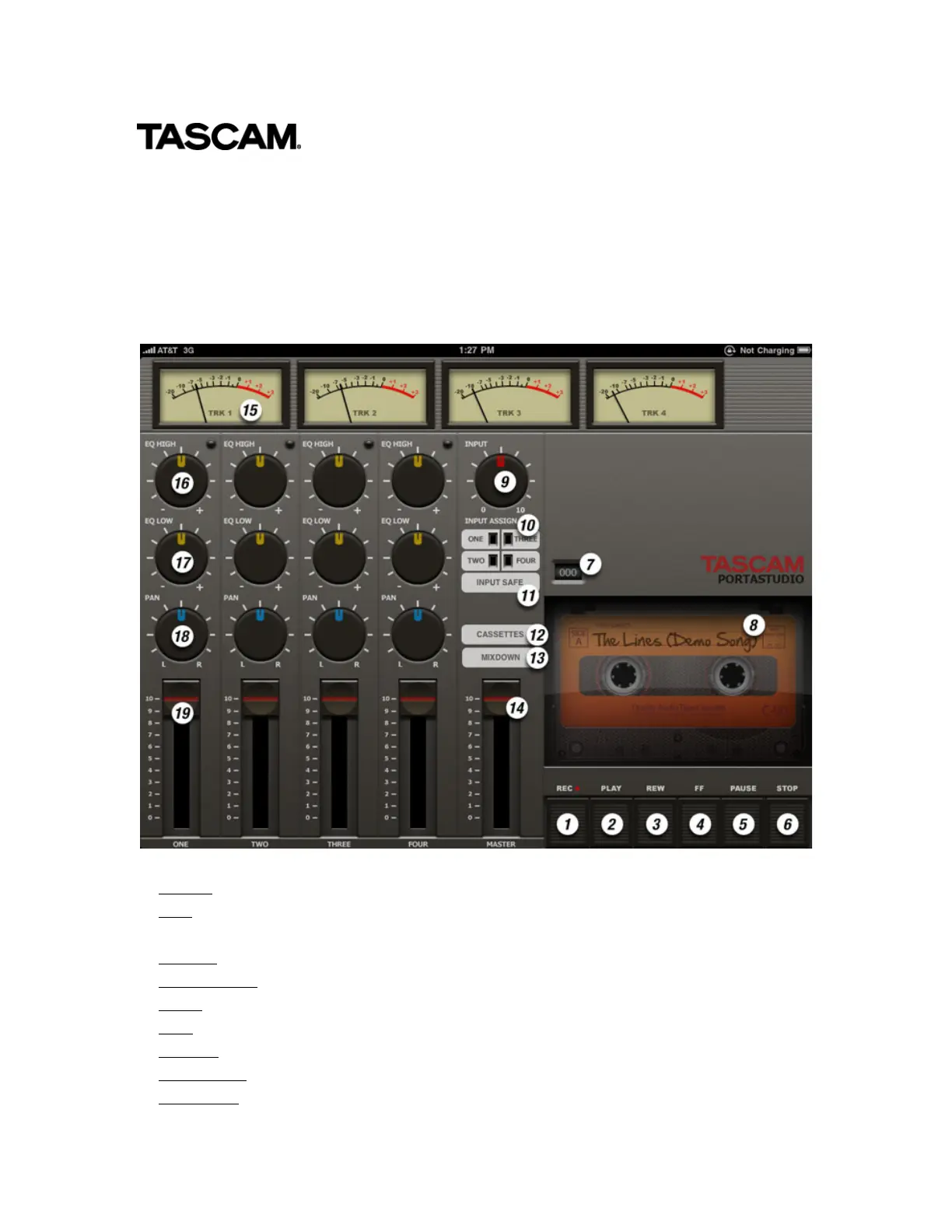
When you launch Portastudio you will see the main screen:
1. Record ("REC") Hold this button while pressing Play to record a track
2. Play Plays back what you've recorded. If you haven't recorded anything, pressing play
has no effect.
3. Rewind ("REW") Move to the beginning of the song.
4. Fast Forward ("FF") Move to the end of the song
5. Pause Stop playback until Pause is pressed again.
6. Stop Stop playback or recording
7. Counter Displays your song position, 000 being the beginning of the tape
8. Song Name The name of your song, as set in the Cassettes screen
9. Input Gain Raises or lowers the level of the microphone that will recorded to a track
Produktspezifikationen
| Marke: | Tascam |
| Kategorie: | Nicht kategorisiert |
| Modell: | Portastudio |
Brauchst du Hilfe?
Wenn Sie Hilfe mit Tascam Portastudio benötigen, stellen Sie unten eine Frage und andere Benutzer werden Ihnen antworten
Bedienungsanleitung Nicht kategorisiert Tascam

6 Oktober 2025
6 Oktober 2025
5 Oktober 2025
5 Oktober 2025
5 Oktober 2025
5 Oktober 2025
1 Oktober 2025
25 September 2025
12 September 2025
10 September 2025
Bedienungsanleitung Nicht kategorisiert
Neueste Bedienungsanleitung für -Kategorien-
3 April 2026
3 April 2026
3 April 2026
3 April 2026
3 April 2026
3 April 2026
3 April 2026
3 April 2026
3 April 2026
3 April 2026