U8 U-Watch Bedienungsanleitung
U8 Smartwatch U-Watch
Lies die bedienungsanleitung für U8 U-Watch (2 Seiten) kostenlos online; sie gehört zur Kategorie Smartwatch. Dieses Handbuch wurde von 29 Personen als hilfreich bewertet und erhielt im Schnitt 4.2 Sterne aus 3 Bewertungen. Hast du eine Frage zu U8 U-Watch oder möchtest du andere Nutzer dieses Produkts befragen? Stelle eine Frage
Seite 1/2
Bluetooth
Watch
Instructions
Thank
you
for choosing ou
U8 deyices. You cm read the
mual,
a
comprehensive mderstmding of the
use of equipmetrt, itr fact,
with a
taste of the futrctiotr md
simple method of operation.
This device is used as long
6 the brmd of intelligent
mchides
de adapted to
use intelligetrt mchines cm slnchronize phonebook
and
provides
a voiety ofuseful features md setrices
to facilitate
you
work
and leisue rctivities in the
smart
machine
opemtion.
The Compmy reserves
the right to make my prior
notice in the
c6e
of
the
contents of this mdul for the right
to amend,
without
notice
When
you
get
a U8
,
md install
"
BTNotificatioLapk
"
progmm
otr the smart
phone,
realize
SMS, LINE, Facebook,
INtugrate,Facebook
Message,
QQ,
weather forecdts
md other instant
messaging remhders.
APKAccessmode: DownloadedfromWeb
address
IP Address:
ttp.
/ /211.
144. 196. 251
User:123456
Password:123456
Doraiload
the
"
BTNotiflcatiorapk
"
AndroidPackage
at the
*U
watch
"
docmetrt
Smart
phone
afier installing
"
BTNotification.apk
"
,
md
smat
phorc
to U8 comection,Filst
pen
smart
phone
dd U8 Bluetooth
featwe,
search U8
Equipment
and comections, smrt
phorc
will
send
"Bluetooth
pairing
rcquest" md then
press
"confim"
,Afte.
pairing
U8 will
prompt
"**
(Comected)
",
About
5 seconds laGr the watch
will
prompt
"sync
date&time with remote"
(sytrchronou
date ild time
functiom need to install
"BTNotification.apk"
in the sm phone
)
,
while there will be a standby interface
"
fl
"
i"oo indicates
a
successful comection has been
you
smrtphorc, Aiq
a sccessful
comectiotr You
cm
watch
the operation
ac@rding
to the following
steps:
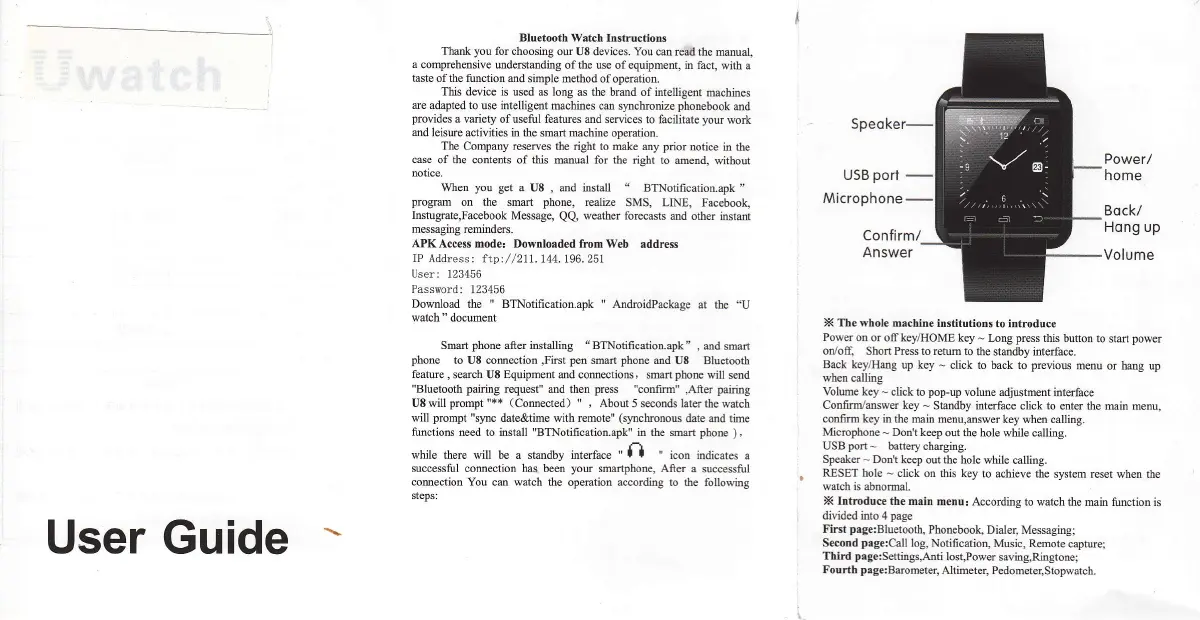
Power/
home
Bock/
Hong up
Volume
X The whole machitre
institutions
to introduce
Power on
or off key/IIOME key
-
Lory
press
this button
to start
power
oD/ofl
Short Press to retm to
the stmdby inteface.
Brck
key/Hmg up key
-
click to back to
previous
menu ot hmg up
when
calling
Volume key
-
click to
pop-up
volue adjustment interface
Confrm,/amwer key
-
Stmdby interface
click
to
mtq the min menu,
contrm key
in the min menu,mswer
key when callitrg.
Microphone
-.
Dotr't keep
out
the
hole while calling.
USBport-
batterychngitrg.
Speaker
-
Don't
ke€p out the hole
while calling.
RESET hole
-
click on this key
to achieve the system
reset when the
watch is
abnoml.
X Itrtmduce the min
meDu! According to watch
the min function is
divided into 4 page
Firet
page:Bluet@th,
Phonebook,
Dialer, Messaging;
S(otrd
prge:Call
1og, Notification,
Music, Remote
capture;
Third
page:SettitrgsAnti
lost,Power
savhg,Ritrgtone:
Fourth
page:Beometet
Altimetet Pedometq,Stopwatch.
User Guide
Produktspezifikationen
| Marke: | U8 |
| Kategorie: | Smartwatch |
| Modell: | U-Watch |
Brauchst du Hilfe?
Wenn Sie Hilfe mit U8 U-Watch benötigen, stellen Sie unten eine Frage und andere Benutzer werden Ihnen antworten
Bedienungsanleitung Smartwatch U8

7 Juni 2023
24 April 2023
Bedienungsanleitung Smartwatch
Neueste Bedienungsanleitung für -Kategorien-
26 März 2026
21 März 2026
19 März 2026
18 März 2026
15 März 2026
12 März 2026
10 März 2026
9 März 2026
7 März 2026
1 März 2026