Hikvision DS-3E0105P-E Bedienungsanleitung
Lies die bedienungsanleitung für Hikvision DS-3E0105P-E (2 Seiten) kostenlos online; sie gehört zur Kategorie Schalter. Dieses Handbuch wurde von 16 Personen als hilfreich bewertet und erhielt im Schnitt 4.5 Sterne aus 7 Bewertungen. Hast du eine Frage zu Hikvision DS-3E0105P-E oder möchtest du andere Nutzer dieses Produkts befragen? Stelle eine Frage
Seite 1/2
2
3
Applicable Models
This manual is applicable to DS-3E0105XX and DS-3E0109XX series 100M long-range PoE
switch.
Symbol Convenons
The symbols that may be found in this document are defined as follows.
·
·During the installaon and ulizaon of the device, please strictly conform to electrical
safety rules in different naons and regions.
·Ensure to use the aached power adaptor only and not to change the adaptor randomly.
Please refer to specificaon table for specific requirements of power adaptor.
·If the product does not work properly, please contact your dealer or the nearest service
center. Never aempt to disassemble the camera yourself. (We shall not assume any
responsibility for problems caused by unauthorized repair or maintenance.)
·The device must be installed in machine room only, and only maintenance staff or
qualified person should access to the device.
·Do not touch the upper cover area of the device that may be overheated.
·Power must be shut down during cable connecon, device installaon and
dismantlement.
·You shall acknowledge that the use of the device with Internet access might be under
network security risks, please strengthen protecon for your personal informaon and
data security. If you find the device might be under network security risks, please contact
with us.
·Proper configuraon of all passports and other security sengs is the responsibility of
the installer, and you shall keep user name and passports properly.
·Please keep all original packing materials properly. If the product does not work
properly, pack the switch in its original packing materials for shipping. We shall not assume
any responsibility for damages caused by improper packing materials during shipping.
·Ensure that your devices powered via the PoE port have their shells protected and
fire-proofed, because the switches are not compliant with the Limited Power Source (LPS)
standard.
4
5
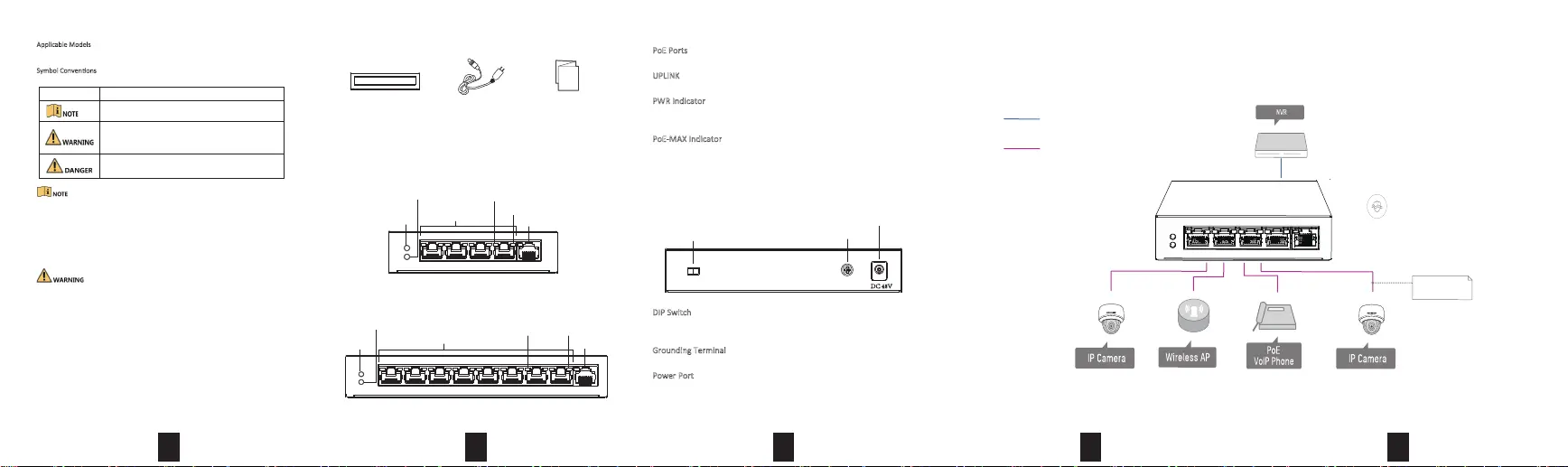
Device Connecon
Connect your devices according to your actual networking requirements.
Interfaces
Rear Panel
Grounding Terminal
Power Interface
DIP Switch
On: Extend model is on, connecng PoE port 1-4 (4 ports), 1-8 (8 ports).
Off: Extend model is off.
Grounding Terminal
The grounding terminal connects with ground cable in case of lightning.
Power Port
Connect power port of the switch with power socket with power cord
to provide power to the switch.
Front Panel
Packing List
1
Switch x1
Quick Start Guide x1
Power Adapter x1
DC 48V
DIP Switch
PoE Ports
100M PoE ports connect to other PoE devices with network cable.
UPLINK
100M network port connects to other switches with network cable.
PWRIndicator
Solid means powered up normally. Unlit means no power supply
connected or power supply is abnormal.
PoE-MAX Indicator
Solid/flashing means the output power of the switch will reach the
upper limit, and the power supply may be abnormal if more devices
are connected. Unlit means power supplying is normal.
DS-3E0105XX Series:
DS-3E0109XX Series:
12345
LINK/ACT Indicator
PoE Indicator
PoE-MAX Indicator
PWR
Indicator
PoE Ports
UPLINK
123456789
PoE-MAX Indicator
PWR
Indicator
LINK/ACT IndicatorPoE Indicator
PoE Ports
UPLINK
Indicates a hazard with a high level of risk, which if
not avoided, will result in death or serious injury.
SymbolDescripon
Provides addional informaon to emphasize or
supplement important points of the main text.
Indicates a potenally hazardous situaon, which if not
avoided, could result in equipment damage, data loss,
performance degradaon, or unexpected results.
6 KV Surge Protection
Data
Power+Data(PoE)
Up to 300 meters
(Port 1-4)
4-Port 10/100M PoE
10/100M Unmanaged PoE Pro-Series
Produktspezifikationen
| Marke: | Hikvision |
| Kategorie: | Schalter |
| Modell: | DS-3E0105P-E |
| Breite: | 132 mm |
| Tiefe: | 93.3 mm |
| Gewicht: | 299 g |
| Produktfarbe: | Blau |
| Höhe: | 27.6 mm |
| Betriebstemperatur: | 0 - 40 °C |
| Relative Luftfeuchtigkeit in Betrieb: | 10 - 90 % |
| Netzstandard: | IEEE 802.3, IEEE 802.3af, IEEE 802.3at, IEEE 802.3u, IEEE 802.3x |
| Vollduplex: | Ja |
| Stromverbrauch (Standardbetrieb): | 632 W |
| Power over Ethernet (PoE): | Ja |
| Anzahl Ethernet-LAN-Anschlüsse (RJ-45): | 5 |
| Warentarifnummer (HS): | 85176990 |
| Stromverbrauch (max.): | 63 W |
| Maximale Datenübertragungsrate: | 100 Mbit/s |
| Ethernet LAN Datentransferraten: | 10, 100 Mbit/s |
| Luftfeuchtigkeit bei Lagerung: | 5 - 90 % |
| Switch-Typ: | Unmanaged |
| Anzahl der basisschaltenden RJ-45 Ethernet Ports: | 1 |
| Basic Switching RJ-45 Ethernet Ports-Typ: | Fast Ethernet (10/100) |
| 10G-Unterstützung: | Nein |
| MAC-Adressentabelle: | 1000 Eintragungen |
| Routing-/Switching-Kapazität: | 1 Gbit/s |
| Rack-Einbau: | Nein |
| Ausgangsstrom: | 1.25 A |
| Eingangsspannung: | 51 V |
| Verkabelungstechnologie: | 10/100Base-T(X) |
| Unterstützung Datenflusssteuerung: | Ja |
| Netzteil enthalten: | Ja |
| Gesamtleistung Power over Ethernet (PoE): | 58 W |
| Anzahl von Stromversorgungseinheiten: | 1 |
| Anzahl Power over Ethernet (PoE) Anschlüsse: | 4 |
| Power over Ethernet (PoE) Leistung pro Anschluss: | 15.4 W |
| Druckanstieg-Schutzspannung: | 4 kV |
Brauchst du Hilfe?
Wenn Sie Hilfe mit Hikvision DS-3E0105P-E benötigen, stellen Sie unten eine Frage und andere Benutzer werden Ihnen antworten
Bedienungsanleitung Schalter Hikvision

21 September 2025
21 September 2025
21 September 2025
21 September 2025
21 September 2025
21 September 2025
21 September 2025
21 September 2025
21 September 2025
21 September 2025
Bedienungsanleitung Schalter
Neueste Bedienungsanleitung für -Kategorien-
31 März 2026
30 März 2026
25 März 2026
22 März 2026
22 März 2026
21 März 2026
20 März 2026
20 März 2026
19 März 2026
19 März 2026