Exibel GHX-3 Bedienungsanleitung
Lies die bedienungsanleitung für Exibel GHX-3 (5 Seiten) kostenlos online; sie gehört zur Kategorie Headset. Dieses Handbuch wurde von 48 Personen als hilfreich bewertet und erhielt im Schnitt 4.9 Sterne aus 7 Bewertungen. Hast du eine Frage zu Exibel GHX-3 oder möchtest du andere Nutzer dieses Produkts befragen? Stelle eine Frage
Seite 1/5
UNITED KINGDOM - CUSTOMER SERVICEcontact number: 020 8247 9300 e-mail: customerser[email protected] internet: www.clasohlson.co.uk postal: 10 – 13 Market Place, Kingston Upon Thames, Surrey, KT1 1JZ
English
5
6
1
2
3
4
7
6
Ver. 20190218
Gaming Headset
Art.no 38-8565 Model GHX-3
Please read theentire instruction manual before use and
then save it for future reference. We reserve theright for any
errors in text or images and any necessary changes made
to technicaldata. In theevent of technical problems or other
queries, please contact our Customer Services.
Safety
• Protect your hearing. Listening on high volume for
prolonged periods can lead to permanent hearingloss.
Setthevolume to alow level before using theproduct.
• Do not attempt to dismantle or repair theproduct, it
contains no parts that can be repaired or adjusted.
• Never subject theproduct to high temperature, dust,
heavy vibration, impacts, humidity or moisture.
Buttons and functions
Troubleshooting guide
No sound in
theheadset.
Check thesetting of thevolume control
(6).
Try connecting to adifferent device,e.g.
asmartphone. Playback arecording or
call someone on thephone to check if
thefault is with theheadset.
Microphone
seems not
towork.
Check that themute button (4) is not
set to OFF.
Connect theheadset to amobilephone.
Callsomeone on thephone to check if
thefault is with theheadset.
Responsible disposal
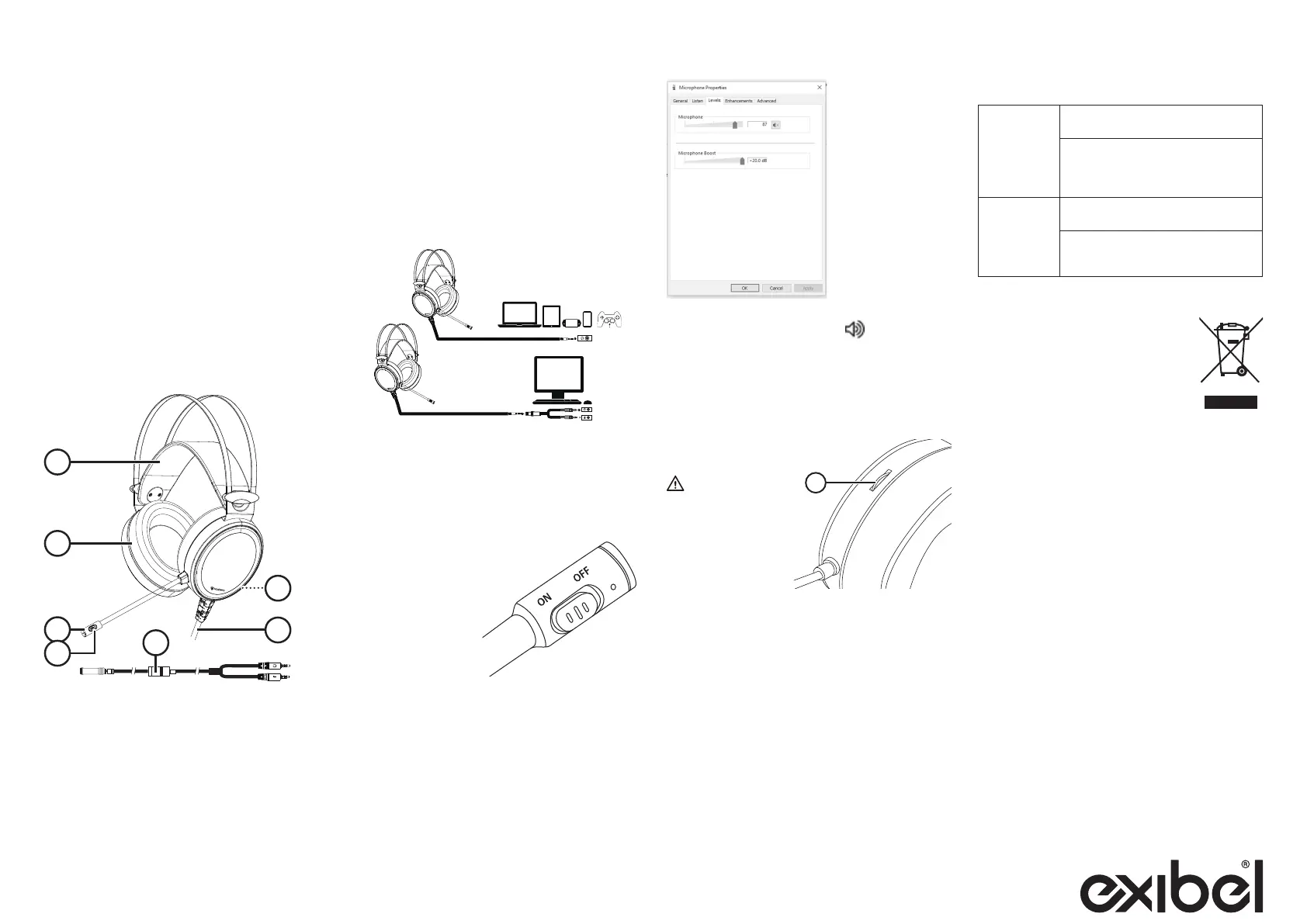
1. Adjustable headband
2. Noise-isolating over-ear earcups
3. Adjustable microphone
4. [ ON/OFF ] Mute button to switch themicrophone on/off
5. Mainslead
6. Volume control dial
7. Adapter cable for connection to aPC
Instructions for use
Connecting the headset to a computer/
controller
Theheadset is compatible with themost common
devices on themarket (Android, iPhone, PC, Mac, X-Box,
Playstationetc.). Depending on theinput/output ports of
thedevice used, anadapter/adapter cable may be required
to connect theheadset.
Refer to theinstruction manual of your device for directions
on adjusting themicrophone and volume levels.
• When connecting to aPC with separate audio and
microphone sockets, use theincluded adapter cable
(7) and connect thegreen plug to theaudio input of
thecomputer and thepink plug to themicrophone input
of thecomputer.
Microphone
• Switch themicrophone
on or off by sliding
themute button (4)
sideways.
• Stretch theincluded
pop filter over
themicrophone to
reduce unwanted
pop sounds.
Adjust thevolume by
turning thevolume dial (6).
Warning
Protect your hearing.
Listening on high volume
for prolonged periods
can lead to permanent
hearingloss.
Care and maintenance
Clean theproduct using adampcloth. Useonly mild
cleaning agents, never solvents or corrosive chemicals.
This symbol indicates that this product
should not be disposed of with general
householdwaste. Thisapplies throughout
theentire EU. Inorder to prevent any
harm to theenvironment or health hazards
caused by incorrect waste disposal,
theproduct must be handed in for recycling
so that thematerial can be disposed of
in aresponsible manner. Whenrecycling
theproduct, take it to your local collection
facility or contact theplace of purchase.
Theywill ensure that theproduct is disposed
of in anenvironmentally sound manner.
Specifications
Headphones
Type Over-ear
Driver diameter 50mm
Frequency range 20–20,000Hz
Sensitivity 95 ± 3dB
Impedance 32 Ω ± 15 %
Power output 50mW
Connection 3.5mm
Cable length 2m
Weight 310g
Microphone
Type Dynamic, omnidirectional,
noise-cancelling
Sensitivity −38 ± 3dB
Impedance 2.2 kΩ
Adapter cable
Type 4-pole 3.5 mm to 2×3-pole 3.5 mm
Cable length 2.5m
Setting the microphone sensitivity
Check thesettings in your computer and adjust
thesensitivity of themicrophone. If thelevel is too
low, theperson you are talking to will have difficulty
understanding what you say, but if it is too high thesound
will be distorted.
For example: Windows 10
1. Right-click on thespeaker symbol
in theactivity field
and select Sounds.
2. Select theRecording tab.
3. Select themicrophone in thelist and press Properties.
4. Select theLevels tab and adjust theMicrophone /
Microphone Boost slider.
Headphones
Produktspezifikationen
| Marke: | Exibel |
| Kategorie: | Headset |
| Modell: | GHX-3 |
Brauchst du Hilfe?
Wenn Sie Hilfe mit Exibel GHX-3 benötigen, stellen Sie unten eine Frage und andere Benutzer werden Ihnen antworten
Bedienungsanleitung Headset Exibel

23 August 2024
23 August 2024
23 August 2024
23 August 2024
Bedienungsanleitung Headset
Neueste Bedienungsanleitung für -Kategorien-
31 März 2026
31 März 2026
31 März 2026
27 März 2026
26 März 2026
26 März 2026
26 März 2026
25 März 2026
24 März 2026
24 März 2026