Hikvision DS-3E0508D-O Bedienungsanleitung
Lies die bedienungsanleitung für Hikvision DS-3E0508D-O (2 Seiten) kostenlos online; sie gehört zur Kategorie Schalter. Dieses Handbuch wurde von 20 Personen als hilfreich bewertet und erhielt im Schnitt 4.2 Sterne aus 6 Bewertungen. Hast du eine Frage zu Hikvision DS-3E0508D-O oder möchtest du andere Nutzer dieses Produkts befragen? Stelle eine Frage
Seite 1/2
Description
Providesadditionalinformationtoemphasizeorsupplement
importantpointsofthemaintext.
Indicatesapotentiallyhazardoussituation,whichifnotavoided,
couldresultinequipmentdamage,dataloss,performance
degradation,orunexpectedresults.
Indicatesahazardwithahighlevelofrisk,whichifnotavoided,
willresultindeathorseriousinjury.
Symbol
2
3
ApplicableModels
Thismanualisapplicableto8-PortGigabitEthernetSwitch.
SymbolConventions
Thesymbolsthatmaybefoundinthisdocumentaredefinedasfollows.
•Duringtheinstallationandutilizationofthedevice,pleasestrictlyconformtoelectrical
safetyrulesindifferentnationsandregions.
•ThisisaclassAproductandmaycauseradiointerferenceinwhichcasetheusermaybe
requiredtotakeadequatemeasures.
•Ensuretousetheattachedpoweradaptoronlyandnottochangetheadaptorrandomly.
Pleaserefertospecificationtableforspecificrequirementsofpoweradaptor.
•Iftheproductdoesnotworkproperly,pleasecontactyourdealerorthenearestservice
center.
•Neverattempttodisassemblethedeviceyourself.(Weshallnotassumeany
responsibilityforproblemscausedbyunauthorizedrepairormaintenance.)
•Thedevicemustbeinstalledinmachineroomonly,andonlymaintenancestaffor
qualifiedpersonshouldaccesstothedevice.
•Donottouchtheuppercoverareaofthedevicethatmaybeoverheated.
•Powermustbeshutdownduringcableconnection,deviceinstallationand
dismantlement.
•YoushallacknowledgethattheuseofthedevicewithInternetaccessmightbeunder
networksecurityrisks,pleasestrengthenprotectionforyourpersonalinformationand
datasecurity.Ifyoufindthedevicemightbeundernetworksecurityrisks,pleasecontact
withus.
•Properconfigurationofallpasswordsandothersecuritysettingsistheresponsibilityof
theinstaller,andyoushallkeepusernameandpasswordsproperly.
•Pleasekeepalloriginalpackingmaterialsproperly.Iftheproductdoesnotwork
properly,packtheswitchinitsoriginalpackingmaterialsforshipping.Weshallnot
assumeanyresponsibilityfordamagescausedbyimproperpackingmaterialsduring
shipping.
4
5
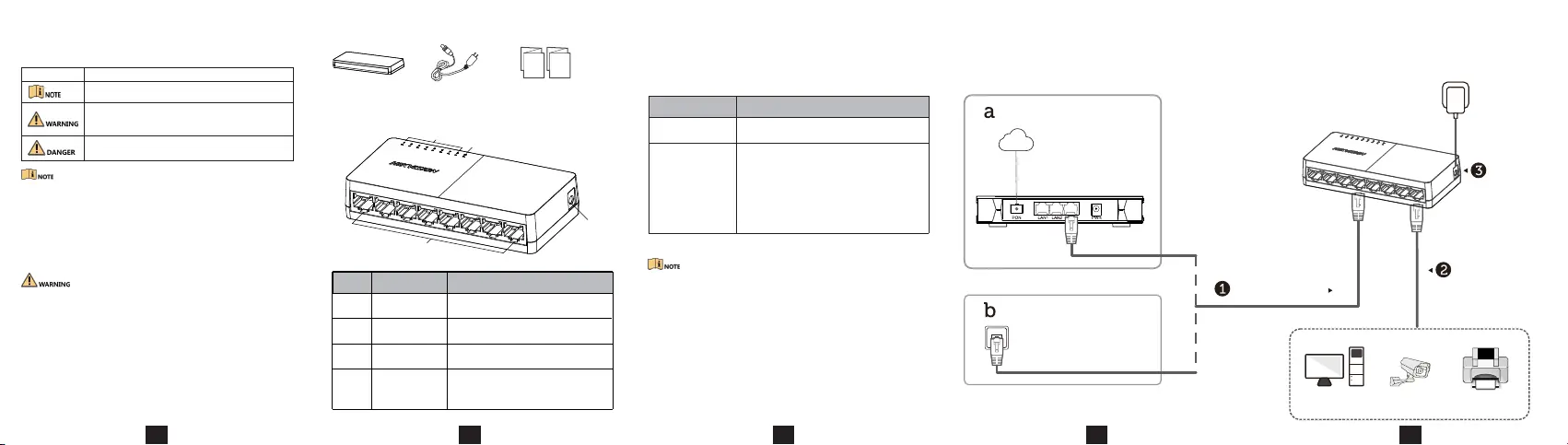
DeviceConnection
Connectyourdevicesaccordingtoyouractualnetworkingrequirements.
Appearance
PackingList
1
Switch×1
PowerAdapter×1
•Preparescrewsyourself.
•Ensurethatthedistancebetweenthetwoscrewsequalstothedistance
betweenthetwohangingholes.
•Setasideatleast4mmofthescrewbodiesoutsidethewall.
DeviceInstallation
Pleaseselecttheappropriateinstallationmethodaccordingtotheactual
needs.
InstallationMethod
Steps
DesktopInstallation
Wall-Mounted
Installation
Placethedeviceonthedesk.
1.Checkthedistancebetweenthetwohanging
holesontherearcoverofthedevice.
2.InserttwoM4screwsintothewall.
3.Alignthehangingholeswiththescrews,and
hangthedeviceonthescrews.
Home/Company
Connecttorouters
ornetworkports.
Connectto
terminals.
Connectto
socket.
Schooldormitory
NetworkPort
NetworkCable
LAN
NetworkcameraPrinter
NetworkCable
or
Router
Internet
Computer
•QuickStartGuide×1
•MultilingualInformation
ofNetworkSwitch×1
①
②
③
④
Indicator/Port
No.
Description
①
②
③
GigabitRJ45Port
LINK/ACTIndicator
PWRIndicator
PowerSupply
Usedforconnectiontoanotherdevicevia
anetworkcable.
Usetheattachedpoweradapterorpower
cordtoconnecttheswitchtoasocket.
IndicatesthestatusesofGigabitRJ45ports
1to8.
Indicatesthepowerstatusoftheswitch.
④
Produktspezifikationen
| Marke: | Hikvision |
| Kategorie: | Schalter |
| Modell: | DS-3E0508D-O |
Brauchst du Hilfe?
Wenn Sie Hilfe mit Hikvision DS-3E0508D-O benötigen, stellen Sie unten eine Frage und andere Benutzer werden Ihnen antworten
Bedienungsanleitung Schalter Hikvision

21 September 2025
21 September 2025
21 September 2025
21 September 2025
21 September 2025
21 September 2025
21 September 2025
21 September 2025
21 September 2025
21 September 2025
Bedienungsanleitung Schalter
Neueste Bedienungsanleitung für -Kategorien-
31 März 2026
30 März 2026
25 März 2026
22 März 2026
22 März 2026
21 März 2026
20 März 2026
20 März 2026
19 März 2026
19 März 2026