KTC H24F8 Bedienungsanleitung
Lies die bedienungsanleitung für KTC H24F8 (2 Seiten) kostenlos online; sie gehört zur Kategorie Monitor. Dieses Handbuch wurde von 23 Personen als hilfreich bewertet und erhielt im Schnitt 4.2 Sterne aus 2 Bewertungen. Hast du eine Frage zu KTC H24F8 oder möchtest du andere Nutzer dieses Produkts befragen? Stelle eine Frage
Seite 1/2
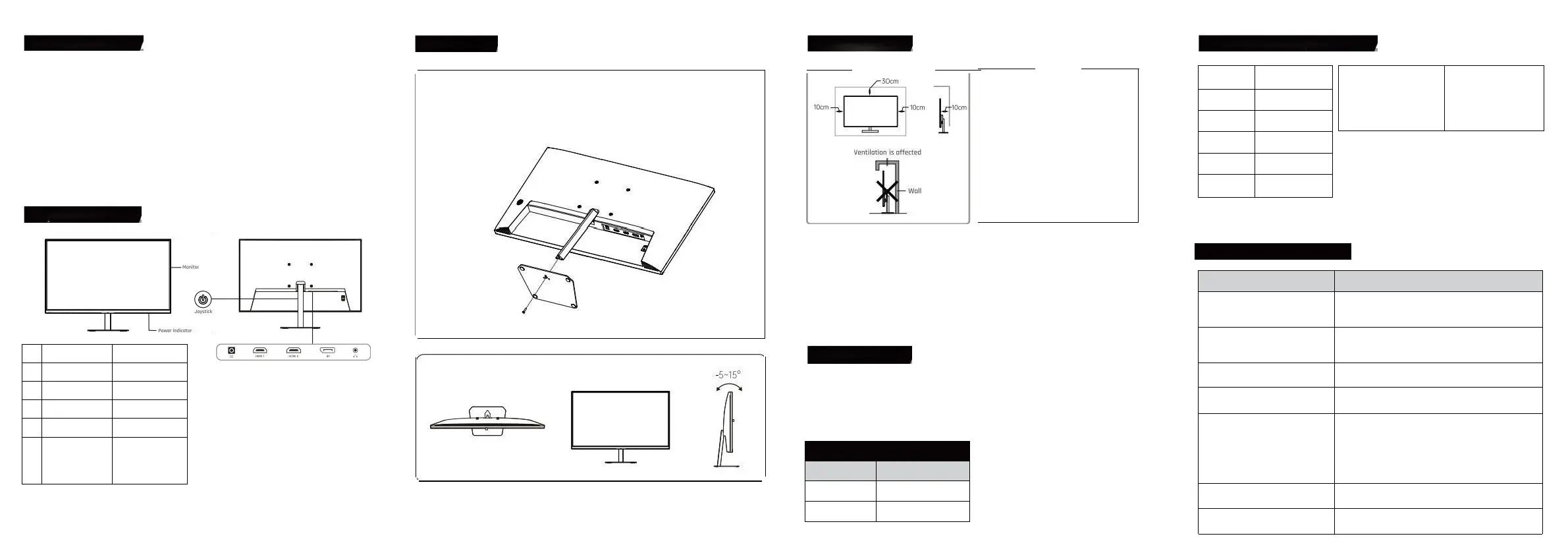
ProductIntroduction
Itisakindofhigh-performanceintelligentmultiplefrequencyscanningdisplay,whichadapts
activemotrixthinfilmtransistorLED-backlitLCD.Laffichageestcontrôléparlatechnologie
numériquedumicroordinateurMCU.Itiscompactandlightweight,whichissuitablefornarrow
workingspaces.
Beforeinstallation,pleasecheckwhichthefollowingorticlesarecompleteinthepackingbox
-LCD×1-PowerAdapter×1-Screwdriverx1
-Base×1-Cartedenvoi×1-Guidedelutilisateur×1
-SignalCablex1
Ifanyoftheaboveproductismissing,pleasecontactwithproductdistributorimmediately.
Avisspécifiqueocossoriesinordertoprevoilinkind.Peasekeppockingmateriosfuture
morement
KeysAndInterfaces
initiolShortcutKeys
EntertheFunctionMenu
EntréesourceSlgnol
MoveUp
Mid
dle
Luminance
MoveDown
shptoutKeyfo
GomingAssistance
Exitand
Retouraumenuprécédent
ShartcutKeys
0penSub-menu
ondSelectonOption
Tm00le
dscowshert-
gressing
Tumoffthedisplay
bypressingand
holdingar3seconds
Tunoffthe
disployby
pressn900d
holdingfor3seconds
PowerIndicator
Lindicateurconstantsignifiequelaffichageestuneopérationinnarmalgthefloshindicatorrepresentsnosignalstate.Under
theenergyconservationstate,hedisploywillnormalementworkifthesignalisprovided.Laffichageeststllpoweredon
thestandbystote.Thus,déplacezlecorddepuissancequandvousnelutilisezpas.
Aboutbase
·Alignthethreepositioningpassesofthesupportandthe
base,thenlockthebaseandthessupportwiththeprovided
screen
MountingLocation
Installersurlabase
InstollationBuide
-LaffichagedevraitêtreinstalléneoranACpowersocketthatconbeeosilypluggoble.
-ltestrecammendedtousesuitoblewallmountbrocketsaroboseforsafetypurpose
-Topreventinjury,thedisployshouldbeplacedonasmoothhorizantolplane,orfixedonefirmwall.
Hfyouneedtoinstallateonawallitshouldbedonebyprofessionoltechnicians.Theimproperdisployinstallationmay
causeinstobMty
-Notplacethedisplaywhereitmightbesufferedfromthemechanicol
vibration.-Notplacethedisplaywhereinsectsmayenter
-Donotplacethedisploydirectlyfocusinganaircaonditianer,ortheinternalponelmaycondense,leodingtofoults
-Donotplocethedisplaywherethereisastrongelectromagneticfield,oritwillbeinterconnectedwithanddamaged
bytheelectromagneticwaves
SafetyProtection
QuandlesignalvidéoduPCdépasselagammedefréquencedelaffichage,lesignalde
synchronisationdeligneetdechampseradisoblesignaldesynchronisationdechamppour
protégerlaffichage.Underthiscircumstance,youmustsetthe
OutputfrequencyofthePCtoanacceptablerangeforthedisploytoworkproperly.
PowerManagementSystem
Mode
PowerConsumption
NormalOperation
Standb
≤36W
y
≤0.5W
ProductTechnicalSpecifications
PanelDimenslon
BestOperatin
23.8"
g
ResolutionRotio
1920×1080@180Hz
nputVoltoge
Contra
DC12V/3A
s
1000:1(TYP)
VisibleArea
Pitchsize
forwollmou
527mm x 296mm
n
100mmx100mm
SimpleProblemsDisposal
Symptoms
DisposalMethods
1.Écranblanc/indicateursde
puissancenefonctionnentpas
Vérifieroùlapprovisionnementenpuissanceestenbon
contactaveclaffichageetlapochedepuissance;Et
vérifieroùledisployesttournéhors
Blurredtoolargeortoosmallimages
Gotothe"ImageSettings"categorymenuandselect
"ImageAutoAdjust"tomakethemonitoradjustoutomatica
llyto
correct.(0nlyavailableformonitorswithVGA)
3.Écransombre
Enterthe"Brightness&Contrast"menutoregulate
thecontrastandthebrightnessofthedisplay
4.Displayoverheating
Leaveatleast10cmofventilatedspacearoundthedisplay.
Donotplacearticlesonthedisplay
5.0ark/lightspotsquandpoweredon
Cestnormal.Parcequeladifférencedetempératureestdans
le
environment,thebacklittubeemitsunevenlightot
theinitiastageafterthedisplayturnson.Toujours,letube
deretourwillemitnormallightafter20minutes,et
thedark/lightspots
Ilseraéliminéàcemoment-là.
6.Imagedistortion,flashing,s
hacking
Checkyourcomputerconfiguration,choosetheco
rrectresolution,andresetyourrefreshrate
7.NoisySignalwhenpoweredoff
Duringthepowerofthedisplay,theremaybesome
noisysignalsonthescreencookedbythenormaldischarge
Ventilation
●Pleaseleavethespacearoundthedispl
aywiththesizeatleostshowinthefigure.
●Donotcouvrelestrousdeventilationou
insérerquelquechosedansleshell.
●Unlessthereisproperventilation
conditionsandadequateventilationspace
Aroundthepay,donotplacethedisploywithin
limitedspace,suchasabookcabinetorabuilt
-incloset.
WarkingEnvironmentRequirements
Maximumoltitude
Atmosphericpressure
Operatingtemperatureandhumidi
tyStarogettempératureand
humidity
5000m
85lpo~106kpa
0C~40C30%-90%oondesdg-20C-
55C20%=93%Nc-ondonhg
SignalCableConnection
ConnecterlesignalcobletotheHOMouOPportdesortiedesignall
e
pCpuisconnecterlautrefindusignalobletoautrecorrespondngportd
e
signalentréesurtheLCO
HeadsetConnection
Afterconnectingthehendset,theewillbeudooutput,
aonditososupporseatemalloudspeakers
RemarkAlltechnicalspedificationsintheUserGuideandon
theexternalpoclingareallowedtochangewithoutpriornotice.if
thereisosubtledifferencebetweentheUserGuideand
theoctuoloperotion,thelattershollprevail.
Produktspezifikationen
| Marke: | KTC |
| Kategorie: | Monitor |
| Modell: | H24F8 |
Brauchst du Hilfe?
Wenn Sie Hilfe mit KTC H24F8 benötigen, stellen Sie unten eine Frage und andere Benutzer werden Ihnen antworten
Bedienungsanleitung Monitor KTC

3 Oktober 2025
31 August 2024
31 August 2024
31 August 2024
Bedienungsanleitung Monitor
Neueste Bedienungsanleitung für -Kategorien-
3 April 2026
3 April 2026
3 April 2026
3 April 2026
3 April 2026
3 April 2026
3 April 2026
2 April 2026
2 April 2026
1 April 2026