Sonicsmith ConVertor E1 Bedienungsanleitung
Sonicsmith Nicht kategorisiert ConVertor E1
Lies die bedienungsanleitung für Sonicsmith ConVertor E1 (2 Seiten) kostenlos online; sie gehört zur Kategorie Nicht kategorisiert. Dieses Handbuch wurde von 32 Personen als hilfreich bewertet und erhielt im Schnitt 4.1 Sterne aus 9 Bewertungen. Hast du eine Frage zu Sonicsmith ConVertor E1 oder möchtest du andere Nutzer dieses Produkts befragen? Stelle eine Frage
Seite 1/2
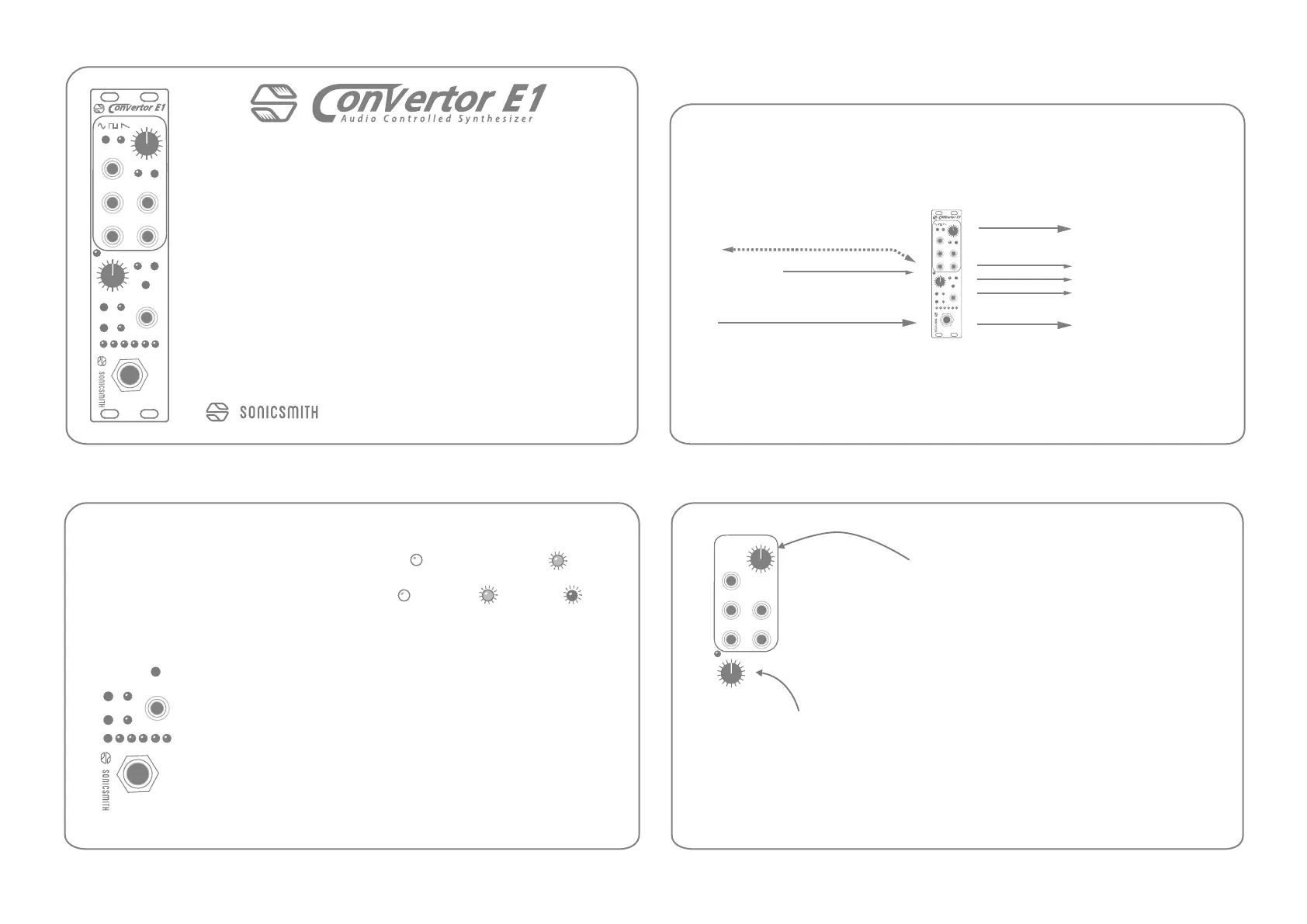
PITCHFM IN
GATE
SYNTH
A-GAIN
ENVGATE
PRE OUT
ENV
TRS
AUDIO IN
+4-10-20-30-40-50
HI Z
FLT
P SHIFT
CQ
+-
+
-
1) Connecting & powering
User Guide Firmware 0.9
To use the ConVertor E1 you need a -12/12V powered Eurorack case with 6HP
(3cm) available space, one available power connection and 150mA of current
available. Connect the power header cable, screw the panel to the rack using at
least two standard M3 screws. Avoid exposing it to sun, fluids or unchecked
physical abuse/shocks.
It’s recommended to
avoid patching any audio signal stronger than +4dBu or
CV signals into the
audio input. The audio & CV outputs of this device are
very loud, potentially around 10V scale so always test a signal’s loudness before
patching it with speakers or headphones on by dimming any speakers first.
Thank you for pre-ordering the ConVertor E1.
The ConVertor will convert an analog monophonic audio signal
into its Pitch, ENV and GATE Control Voltage, DC signals to control
external analog synths. It also provides its own internal digital
synth that is always in perfect tune to the incoming audio’s pitch.
It can work by itself with external synths or soon will have an
option to expand to a full synth voice on its own right, via Firm 2.x
series (available soon). You can also expand it via a MIDVertor E1
adding sustain pedal, MIDI i/o, arpeggiation and mainframe for up
to 7 additional ConVertors in parallel.
Feel free to write us with any feedback, question or concern at:
Oct. 2021
PITCHFM IN
GATE
SYNTH
ENVGATE
P SHIFT
+-
+
-
3) Knobs assignments: default
Turn theP SHIFTknobto increase/decrease the pitch shi
of the internal DCO as well as the CV PITCH output across -2-+2
octaves. Press the P SHIFT knob to bypass the shi back to
unison. Press it again to undo/redo.
Turn the
GATEknob to increase/decrease the gate’s threshold by +/- 1dB.
Default GATE
threshold is -35 dBFSand will effect the ENV CV output by
shutting the ENV CV to 0V as well as the SYNTH OUT audio off. Connect pre out
using a minijack TS to a +18dBu capable destination like modular synths.
Audio Controlled Synthesizer
PITCHFM IN
GATE
SYNTH
A-GAIN
ENVGATE
PRE OUT
ENV
TRS
AUDIO IN
+4-10-20-30-40-50
HI Z
FLT
P SHIFT
CQ
+-
+
-
Audio Controlled Synthesizer
2) Preamp section
Connect a TS or TRS Mic/Inst./Line 1/4” plug into the audio input
If you play a pickup inst. press the
HI Z
to toggle between
analog input HPF frequencies:
Press
A-GAIN to activate Auto-GAIN detection. Play loudly
once or twice, and aer 2.5 seconds, the gain will be set and the
meter will go back to showing input levels. The gate will not
effect the PRE OUT levels. To change the
gain manually,
push the GATE knob and adjust the gain with the encoder. If you
don’t touch the knob again for 1.5 seconds, it will change back
to controlling the gate threshold.
The PRE OUT is a copy of the same signal going in to the ADC.
Press
FLT
LOW Z: 50 kOhm
20 Hz80 Hz
GREEN
GREENRED
160 Hz
HI Z: 2000 kOhm
A-GAIN
PRE OUT
TRS
AUDIO IN
+4-10-20-30-40-50
HI Z
FLT
Mic/Inst/line input
Synth out
FM CV in
Pitch CV
ENV CV
GATE CV
Preamp out
“Sonicsmith bus” 4 pin header
to other E1 devices (optional)
Balanced/unbalanced
ConVertor E1 User Guide - Firmware 0.9 Oct. 2021ConVertor E1 User Guide - Firmware 0.9 Oct. 2021
ConVertor E1 User Guide - Firmware 0.9 Oct. 2021
ConVertor E1 User Guide - Firmware 0.9 Oct. 2021
Produktspezifikationen
| Marke: | Sonicsmith |
| Kategorie: | Nicht kategorisiert |
| Modell: | ConVertor E1 |
Brauchst du Hilfe?
Wenn Sie Hilfe mit Sonicsmith ConVertor E1 benötigen, stellen Sie unten eine Frage und andere Benutzer werden Ihnen antworten
Bedienungsanleitung Nicht kategorisiert Sonicsmith

23 August 2024
Bedienungsanleitung Nicht kategorisiert
Neueste Bedienungsanleitung für -Kategorien-
3 April 2026
3 April 2026
3 April 2026
3 April 2026
3 April 2026
3 April 2026
3 April 2026
3 April 2026
3 April 2026
3 April 2026