TeachLogic Voicelink Plus Bedienungsanleitung
TeachLogic Nicht kategorisiert Voicelink Plus
Lies die bedienungsanleitung für TeachLogic Voicelink Plus (2 Seiten) kostenlos online; sie gehört zur Kategorie Nicht kategorisiert. Dieses Handbuch wurde von 48 Personen als hilfreich bewertet und erhielt im Schnitt 4.9 Sterne aus 4 Bewertungen. Hast du eine Frage zu TeachLogic Voicelink Plus oder möchtest du andere Nutzer dieses Produkts befragen? Stelle eine Frage
Seite 1/2
Quick Start Guide
Getting to Knoour Sound System w Y
Make note of the location of the speakers and ceiling sensor in
your classroom. Ensure that you have unpacked and charged
your battery-powered microphones. Keep this guide handy
for future reference.
Please note that some amplifier/receiver controls will differ.
Refer to their markings, user manual, or our teachlogic.com
for more information on their function.
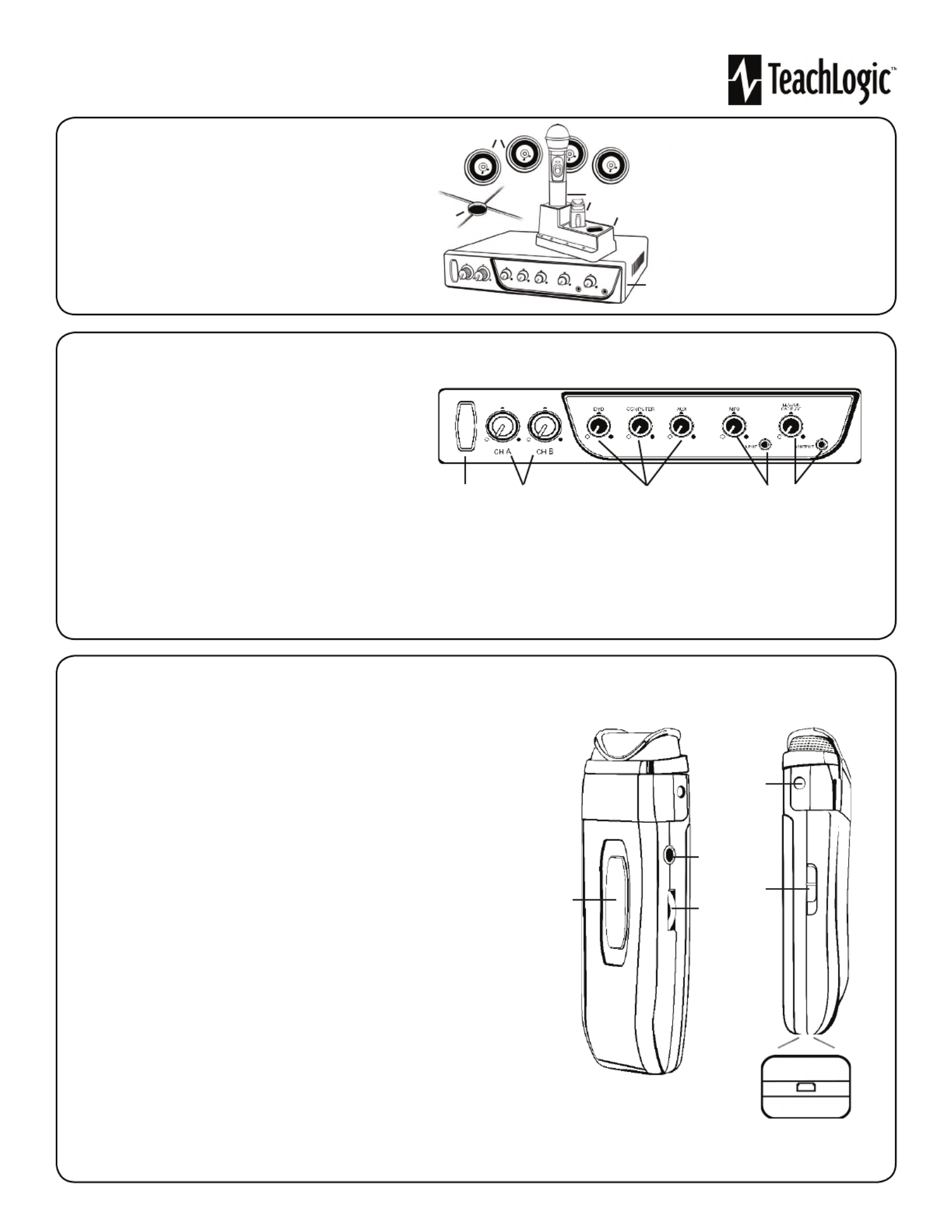
STEP 1. USING THE AMPLIFIER/RECEIVER
1. Speakers
2. Ceiling Sensor
3. Wireless Microphones
4. Microphone battery
charger
5. Receiver/Ampli er
1. Power & Status Indicator
• Red: OFF
• Blue: ON and activated
• Amber: STANDBY
2. Mic Channels/Volume Controls
• Green light: Microphone on and connected to
channel
• No light: Microphone is not on; and/or sensor is not plugged
in; and/or sensor is not receiving mic signal
3. Input Volume Controls
•Controls volume of connected external
devices
1 2 3 4 5
4. Input Jack and Volume Control
• Connects additional external devices to the system (ex. iPhone or mp3 player)
5. Output Volume Control and Output Jack
• Connects devices for recording lessons
(1)
1
2
3
4
5
STEP 2. USING THE SAPPHIRETM PENDANT MICROPHONE
1. Power button and status indicator
• Solid Red: OFF
• Solid Blue: ON
• Solid Purple: External devices quieted
2. Mute microphone: Brie y press power button once ( ashing blue).
Unmute microphone: Brie y press power button again (solid blue).
3. Aux Input: Connects devices (like music player) to microphone.
4. Priority Switch: Changes volume of devices plugged into amp inputs
• To increase/decrease volume level: Slide button up or down
• To immediately quiet volume level of external device: Push button once
• To resume volume level of external device: Push button again
5. Activate Security Alert Feature (when available)
• Hold Priority Switch down for 5 seconds. The power light on the amp will ash green,
then return to solid blue.
6. Gain Switch
• There are 3 levels to adjust your microphone volume.
• Set gain at “Normal”. You may reduce the volume by setting it to -3dB or -6bD if your
mic is too loud.
7. Lanyard attachments
• Microphone should rest where your collar bones meet.
8. USB Charge Port (found on the bottom of the mic)
1
2
3
4, 5
8
6
7
Produktspezifikationen
| Marke: | TeachLogic |
| Kategorie: | Nicht kategorisiert |
| Modell: | Voicelink Plus |
Brauchst du Hilfe?
Wenn Sie Hilfe mit TeachLogic Voicelink Plus benötigen, stellen Sie unten eine Frage und andere Benutzer werden Ihnen antworten
Bedienungsanleitung Nicht kategorisiert TeachLogic

22 Juni 2025
14 Juni 2025
5 August 2024
30 Juli 2024
27 Juli 2024
23 Januar 2024
13 Dezember 2023
14 November 2022
Bedienungsanleitung Nicht kategorisiert
Neueste Bedienungsanleitung für -Kategorien-
3 April 2026
3 April 2026
3 April 2026
3 April 2026
3 April 2026
3 April 2026
3 April 2026
3 April 2026
3 April 2026
3 April 2026