Exibel ZW-51025 Bedienungsanleitung
Exibel Fernbedienung ZW-51025
Lies die bedienungsanleitung für Exibel ZW-51025 (6 Seiten) kostenlos online; sie gehört zur Kategorie Fernbedienung. Dieses Handbuch wurde von 41 Personen als hilfreich bewertet und erhielt im Schnitt 4.8 Sterne aus 6 Bewertungen. Hast du eine Frage zu Exibel ZW-51025 oder möchtest du andere Nutzer dieses Produkts befragen? Stelle eine Frage
Seite 1/6
GREAT BRITAIN - CUSTOMER SERVICEcontact number: 020 8247 9300 e-mail: customerservice@clasohlson.co.uk internet: www.clasohlson.co.uk
English
Ver. 20141027
Remote control with
keyboard and gyro mouse
Art.nr 18-8417 Modell ZW-51025
38-6633 ZW-51025
Please read theentire instruction manual before using theproduct
and then save it for future reference. Wereserve theright for
any errors in text or images and any necessary changes made
to technicaldata. Intheevent of technical problems or other
queries, please contact our Customer Services.
Safety
• When thebattery is charged, remove thechargercable.
• Never attempt to dismantle or modify theproduct.
• Do not expose theproduct to moisture anddamp.
• Thebattery will discharge if theproduct is not used for
alongtime.
• Only use thecharger supplied.
• Overcharging shortens thelife of thebattery.
• Only use thesupplied charger cable and accessories.
Product description
Combined remote control with keyboard and gyromouse.
IRremote function with nine buttons which can be
programmed using your TV remote, and awireless QWERTY
keyboard to easily type in internet addresses, YouTube
searches,etc. Thebuilt-in gyro mouse allows you to accurately
control themouse pointer on thescreen with simple hand
movements, just like aregularmouse. Nomouse pad or flat
desk space is needed. Built-in rechargeable battery.
Care and maintenance
Clean theproduct by wiping it with asoft, dampcloth.
Neveruse solvents or abrasive cleaning agents.
Disposal
This product should be disposed of in accordance with local
regulations. Ifyou are unsure how to proceed, contact your
local council.
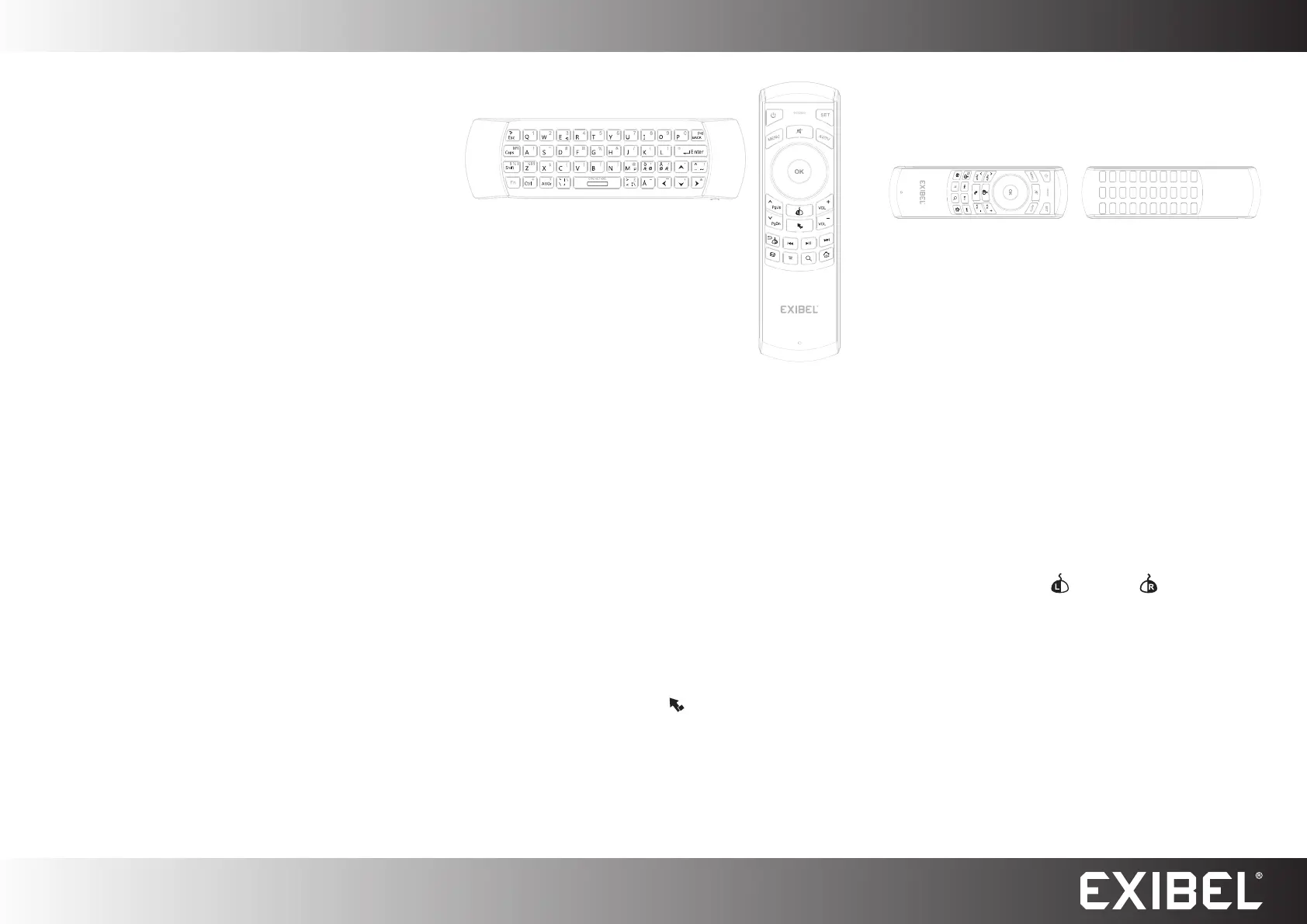
Buttons and functions
Remote control
Theorange buttons belong to theremote control.
Programming
Operating instructions
The keyboard
Thewhite keys belong to thekeyboard and
gyro mouse.
1. Plug theUSB receiver into thecomputer.
Thekeyboard can also be used for some
newer TV models. Referto theinstruction
manual for your TV to find out if it supports
thekeyboard.
2. Start thekeyboard by moving theslider to ON.
3. Thekeyboard pairs with thedevice automatically so you
can start using it straightaway.
4. Switch thekeyboard off by moving theslider to OFF.
NB. Youcan recharge thekeyboard’s built-in battery via
theUSB socket. TheLED lights up red while charging and
goes out when fully charged. Theproduct can be used while
charging. Whenthebattery is almost empty, theLED willflash.
Gyro mouse
Theproduct can be used as amouse pointer.
1. Point thetop of theproduct towards thescreen to control
thepointer.
2. Use thewhite buttons to perform what you want todo.
NB. Youcan use thelock button [
] at any time to enable
and disable thegyromouse.
Automatic shut off
Thekeyboard shuts off automatically after 3 minutes of
inactivity. AllLEDs turnoff. Activate thekeyboard again by
pressing any button.
1. Press and hold [ SET ] for about 4 seconds. TheLED blinks
once and then stayssolid.
2. Point theIR sensor on theremote control towards theIR
sensor of theoriginal remote control. Thedistance
between them must not be more than 7cm.
3. Then press any button on theremote control, theLED will
flash twice and then stay solid, which means that it is in
programmingmode.
4. Press any button on theoriginal remote control that you
want to programme, theLED will flash three times on
theremote control and then stay solid, which means that
programming is complete.
5. Repeat steps 2–4 until all thebuttons are programmed.
6. Press and hold [ SET ] for about 10 seconds toend.
Troubleshooting guide
If themouse pointer begins to wander on thescreen or does
not follow your movements, theproduct can be calibrated.
1. Place thekeyboard on aflat surface.
2. Press and hold theleft [
] and right [ ] mouse buttons
for about 3 seconds and then release.
Specifications
Range Upto 10m
Compatible with Windows 8, 7 (32/64-bit),
Vista (32/64-bit) and XP
Supplied with USB charging cable and 2.4 GHz
nano receiver
Size 156×49.5×10 mm
Produktspezifikationen
| Marke: | Exibel |
| Kategorie: | Fernbedienung |
| Modell: | ZW-51025 |
Brauchst du Hilfe?
Wenn Sie Hilfe mit Exibel ZW-51025 benötigen, stellen Sie unten eine Frage und andere Benutzer werden Ihnen antworten
Bedienungsanleitung Fernbedienung Exibel

23 August 2024
Bedienungsanleitung Fernbedienung
Neueste Bedienungsanleitung für -Kategorien-
21 März 2026
17 März 2026
14 März 2026
6 März 2026
2 März 2026
1 März 2026
26 Februar 2026
26 Februar 2026
16 Februar 2026
27 Januar 2026